EverQuest Legends Exaltation Planner
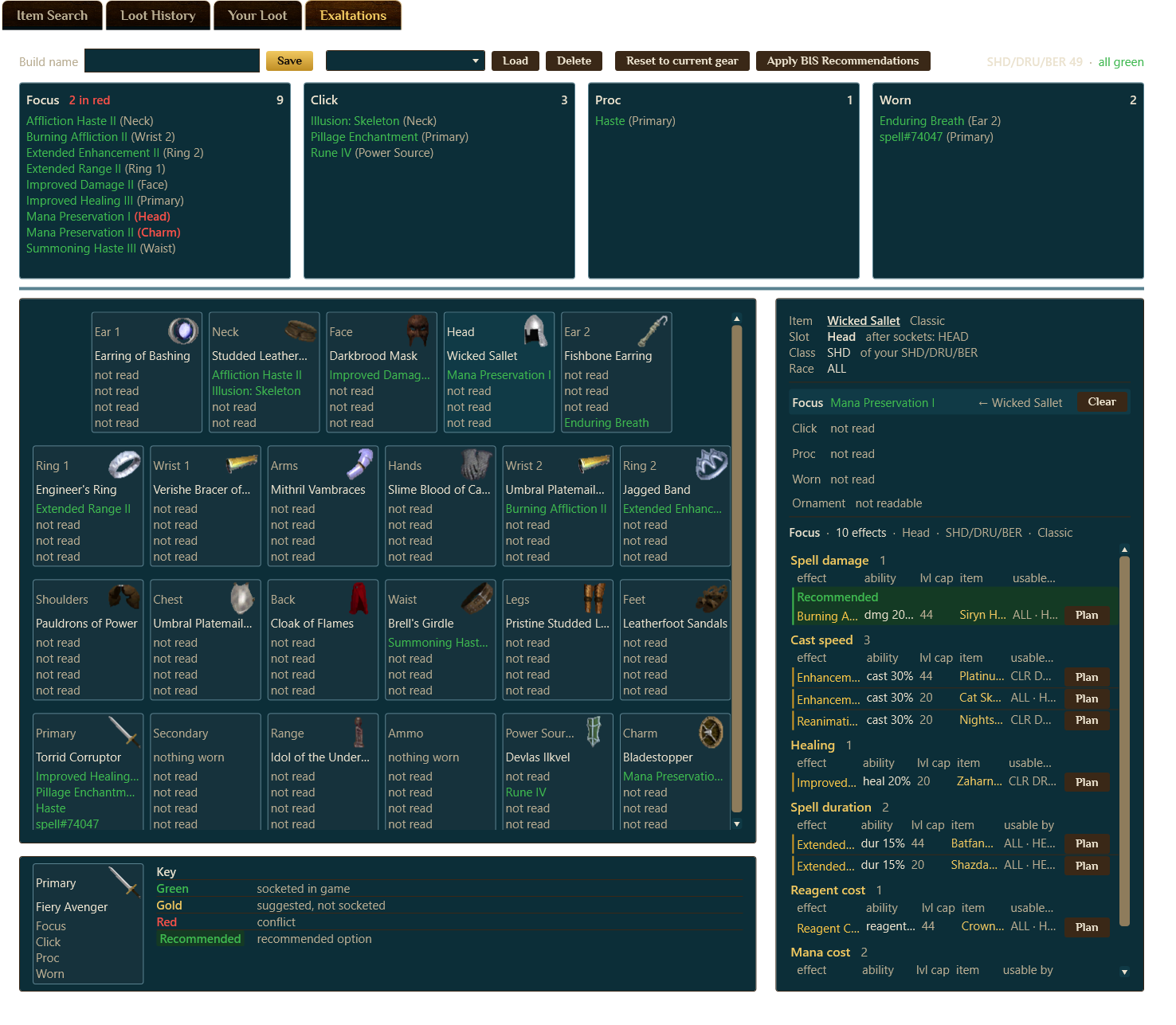
Exaltations are the sockets that quietly decide your character, and getting them right by hand means comparing hundreds of effects across every slot, for every class you play. The planner does that math for you: it solves the best-in-slot set of Focus, Click, Proc and Worn exaltations across your whole loadout, tells you what to socket right now, and hands you a shopping list for the rest.
1. What exaltations are
In EverQuest Legends, exaltations are special effects you socket into your worn gear, a piece of custom content this server added on top of classic EverQuest. Each one lives in a socket on a piece of equipment and comes in one of four kinds:
- Focus: a scaling bonus, "raise stat X by Y percent, up to spell level N." Cast speed, spell damage, spell duration, healing, and the rest. A focus has a level cap and softens past it, which is exactly the kind of three-number trade-off that is miserable to compare by hand.
- Click: a clickable spell baked into the item, an extra button you would not otherwise have.
- Proc: a chance-on-hit effect, from point-blank AE damage and direct damage to lifetaps, damage-over-time, and body-type nukes.
- Worn: a passive effect that is simply on while the item is worn.

A full set of gear has dozens of these sockets, and the "best" answer is not one slot at a time. It is the best combination, because the same effect often lives on several items and you only need it once.
2. What the planner does
The planner reads your worn gear and the exaltations you already own straight from the running game, then solves the whole board at once. It lines up every socket against every effect it could legally take and finds the assignment that covers the most ground, so you are not doubling up on one focus while a second one you own sits in the bag. Two rules keep it honest:

- It only recommends what keeps the item usable. A focus that would make the host piece unwearable by one of your classes is never recommended, even if it is the strongest effect on paper.
- It never invents a priority. By default every effect axis is weighted flat, because there is no single "best stat" that holds across a mixed group of classes. You can lean the weights toward what you care about, but it never pretends spell damage beats cast speed for a trio that wants both.
3. Built for your class trio
In Legends a single character is three classes at once, which is exactly the case no wiki "best-in-slot list" can solve, because those lists assume one class at a time. The planner is built around it: you tell it your class trio, the three classes your character is, and the whole solve runs for all of them together. A pick only counts if it is usable across all three, and coverage is measured against the trio, not a single class.
4. Owned versus aspirational
Every recommendation is one of two things, and the difference is the whole point:
- Owned: an exaltation you are holding right now that the solve wants in a specific socket. These are the actionable rows. Socket it and you are done.
- Aspirational: nothing you own fits this socket as well as it could, so the planner names the best effect the slot could legally take and where it comes from. This is a shopping list, never socketed for you, so an actionable plan never quietly hides the better thing you fell short of.
For each pick it also tells you how replaceable it is: whether another socket could carry the same effect at no loss, and how many sockets on your character even offer it. A row that says it is tied with three others is telling you not to stress about that slot; a row with no ties is telling you it is the one that matters.
5. Reading the board
The board is your working set for a class trio, saved so you can keep tuning it. For any item you select, it lists the best options per kind (Focus, Click, Proc, Worn), grouped by the effect they give, with the effect's magnitude, its level cap, the source item it comes from, and which classes can use it. A Plan button on each row adds it to your to-get list. Colors carry the state at a glance:
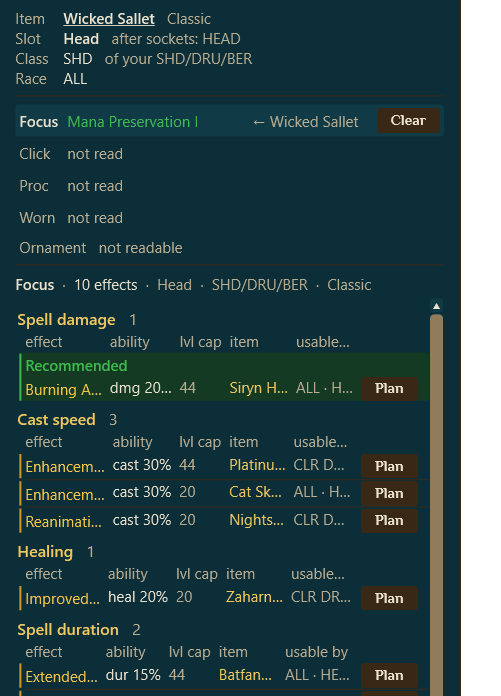
- Green: already socketed in the game. Nothing to do.
- Gold: suggested but not socketed yet. You own it; the solve wants it here. Socket it and it turns green.
- Red: a conflict, two things fighting for the same slot or an effect that cannot sit where it is.
- Recommended: the single best option for that slot, called out so the pick is not buried in the list of alternatives.
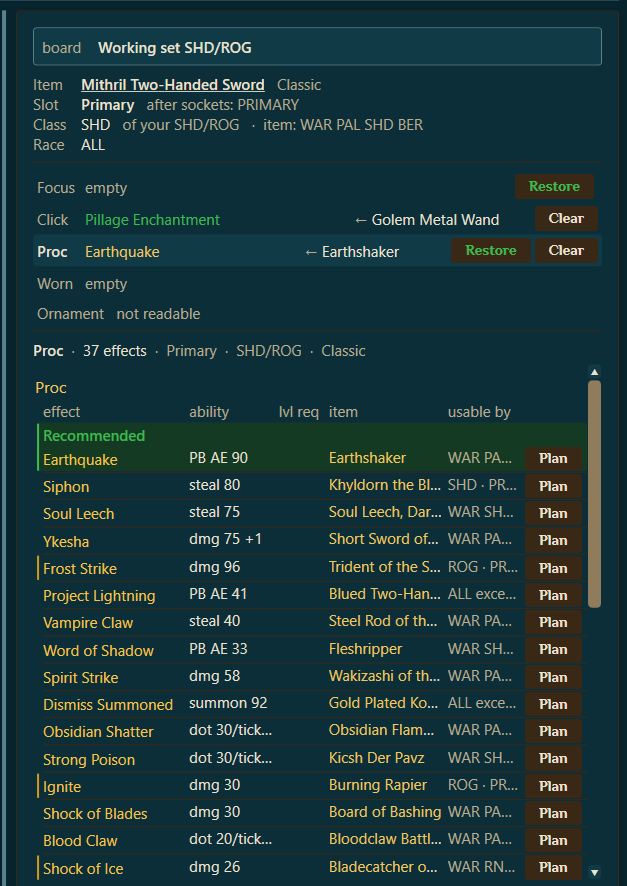
The board works the same for every kind of socket. Click a Proc, for example, and you get its full list of options, here 37 proc effects for a two-hander, each with its source item and a Plan button:
6. How to use it
Step 1. With the game running, open the Item Finder and switch to the Exaltations view. Turn on the live connection so it can read your gear and the exaltations you already hold.
Step 2. Set your class trio on the board, the three classes your character is.
Step 3. Work the gold rows first. Each one is an exaltation you already own that just needs socketing into the slot named. Do those in game and watch them turn green.
Step 4. Clear any red conflicts, the board tells you which slot is contested.
Step 5. Hit Plan on the aspirational rows you want to chase, and you have a concrete list of which items to go get and what they will unlock, instead of guesswork.
Where to next
Want a second opinion on a tricky loadout, or found an exaltation the catalog does not know yet? Bring it to the BasaBots Discord. Or jump in: