EverQuest DPS Meter
A live combat parse that ranks every attacker by DPS as the fight happens, with per-skill breakdowns and a saved history of your recent fights.
1. About the tool
The DPS meter ranks every attacker in a fight by damage per second, live, as the fight unfolds. It shows who is carrying the group and exactly how: hit percent, crit percent, max hit, and total damage. One toggle flips the same parse between damage dealt, damage taken, and healing done, so you can see who tops each board. Every fighter can be broken down to the individual ability, and your recent fights are saved so you can compare pulls and prove a trend.
The part that makes those numbers worth comparing is where a fight starts and stops. The meter follows your group's actual combat rather than waiting for the log to go quiet, so a busy camp can't leave your clock running, and a multi-mob pull counts as one fight instead of several undersized ones. There's a picker to split any fight back down to a single enemy when you want it.
2. How it works
The DPS meter reads your EverQuest combat log. Every swing, spell, heal, and miss the game writes to the log is parsed the instant it lands, which is what makes the ranking update live during the fight.
Combat logging must be on for the parse to work. It is the same one-time step the rest of the app uses:
- In EverQuest, type
/log onand press Enter. - Logging then stays on across sessions. If it is off, the app shows a banner and the parse stays empty.
If the meter is blank mid-fight, logging is almost always the cause. Confirm with /log on and the next swing will appear.
Turn on your combat chat filters
This is the step people miss. EverQuest only writes a line to the log if its chat filter is set to show it. If a combat filter is hidden, that damage never reaches the log, so the parse silently undercounts, your group-mates' hits vanish, crits look low, or your pet seems to do nothing.
Rule of thumb: if a number on the parse looks too low, a chat filter is hiding the messages behind it.
Open your filters from the in-game Options → Filters window (or right-click a chat window and choose Filters). Make sure these are set to show, not hide:
- Melee: and inside it, the ones that matter most for a group parse: Your Hits, Others Hits, Others Hits (Critical), Critical Hits, Pet messages, and Pet Criticals. Hiding "Others Hits" is the classic reason a group-mate shows zero damage.
- Spells: so nukes, DoTs, and procs are counted.
- Damage Shields: otherwise damage-shield ticks go missing.
- Pet Responses and the Melee pet lines above: so pet (and charm-pet) damage is captured.
The simplest fix is the ALL option at the bottom of the Melee submenu (and the top-level Filters menu): set it to show and every combat line is logged. You can always tidy the non-combat chatter later; the parse only cares that the damage lines are visible.
3. UI overview
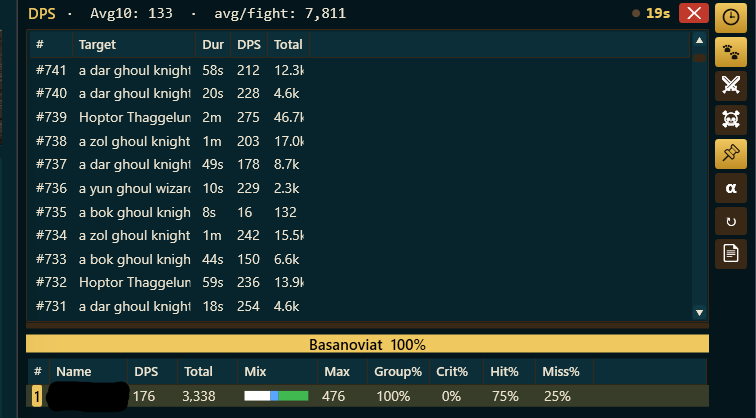
Open the meter with the DPS button. With logging on, pull a mob and it fills in immediately, there's nothing to start by hand. The DPS meter is the live window you watch during a fight. It's a master-detail layout: a list of fights up top (the master), and the per-attacker breakdown for whichever fight you've selected below it (the detail). Double-clicking a name opens a second window, the Full Stats window, covered in section 5.
The header
The top line keeps a baseline in view at all times: the 🕒 Fights button in the corner, your rolling Avg10 (average DPS over your last 10 fights), your avg/fight (average total damage per fight), and the current fight's elapsed time.
Avg10 only counts fights the meter could cleanly bound, so one runaway parse can't drag your average down. After an update that changes how fights are timed it reads building for a little while, until you've fought enough for a fresh average.
The fights list (master)
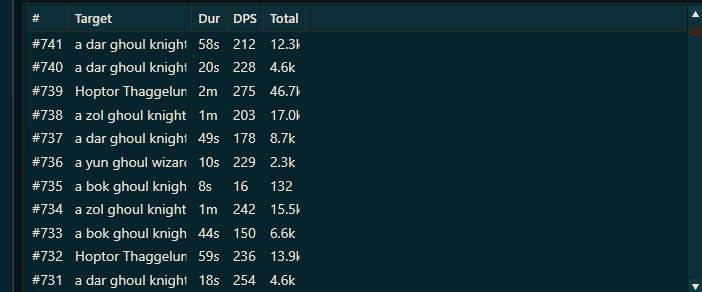
A sortable table of your recent fights, opened with the 🕒 Fights button in the window's top-left corner. The live (or last-active) fight is pinned at the top as ▶ Current. Click a fight to load its breakdown below; click a column header to sort; drag a divider to resize. Columns:
- #: the fight number (▶ Current for the live one).
- Target: the mob you fought. A multi-mob pull reads as one fight, named for the first one, like a sand scarab +2.
- Dur: how long the fight lasted.
- DPS: damage per second for that fight.
- Total: total damage dealt in that fight.
- A badge on the right marks any fight the meter couldn't cleanly bound, and any fight recorded before the timing rework, since those aren't comparable with the rest. Nothing is deleted; they just don't count toward your average.
The contribution bar and the enemy picker
Below the fights list sits a single horizontal stacked bar. Each segment is one attacker, and its width is that attacker's share of the fight's total damage. The colors match the # cell of each row in the breakdown below, so you can trace a row to its slice of the bar by color alone.
Just left of that bar is the enemy picker. It sits on All by default and splits the fight by enemy when you pick one, so you can see what a single mob in a multi-mob pull actually took. It turns gold while one enemy is selected, so a smaller number is never mistaken for the whole fight.
The breakdown table (the detail): every column

One row per attacker in the selected fight, sortable by any column. Right-click a header to show or hide columns, drag the divider between headers to resize, double-click a name to open that combatant's full stats, and right-click a name to include or hide that player (see section 5). The columns:
- #: rank in the fight, on a colored chip that matches this attacker's segment in the contribution bar.
- Name: the attacker (you, a group member, or a pet).
- DPS: that attacker's damage per second this fight.
- Total: their total damage this fight.
- Mix: a tiny stacked bar showing how their damage splits across Melee, Spells, DoT, and Pet, so you see at a glance whether someone is mostly swinging or mostly casting.
- Max: their single biggest hit.
- Group%: their share of the group's total damage this fight. Always 100% solo; in a group it's how you spot the top contributor.
- Crit%: crit rate (crit hits ÷ hits).
- Hit%: hit rate (hits ÷ (hits + misses)).
- Miss%: miss rate.
- Active (optional, right-click a header to add): the span from their first hit to their last hit, i.e. how long they were actually swinging, not how long the fight ran.
- Avg (optional): average damage per hit.
Hover any attacker row for a pop-up that breaks their damage down by type (melee / spell / DoT percentages) and, when pets are merged, the pet subtotal.
4. The icon rail: every button
The vertical strip of buttons along the right edge of the live window controls what the parse shows and how the window behaves. A button glows gold when it's on. (The 🕒 Fights toggle used to live here; it now sits in the window's top-left corner, so it stops moving as the list it opens slides in and out beneath it.) Top to bottom:
- 🐾Pets combined (on by default): when on, a pet's damage merges into its owner's row. Turn it off to give pets their own rows and see each one's individual contribution. (More on pets and charm pets below.)
- ⚔View mode: click to cycle what the parse measures: Damage Done (⚔), then Damage Taken (🛡), then Healing (✚). The button lights up when you're not on the default Damage Done.
- ☠End on kill: closes the fight the instant a mob dies and nothing else has been hit recently. Off by default, because fights already end when your group's combat does (see section 5). Turn it on for the strictest possible single-pull parse.
- 📌Always-on-top (on by default): keeps the DPS window above everything else, including EQ in windowed or borderless mode.
- αBackground transparency: opens a slider; drag left to make the window's background more see-through so it sits lightly over the game. The text stays fully opaque.
- ↻Reset: reset the live session and clear the saved history.
- 📄Log path: pops out the path of the log file the parse is reading, so you can confirm it's watching the right one.
5. Advanced use
Where a fight starts and stops
This is the thing that separates a number you can compare from a number you can't. The meter follows what you and your group are actually fighting, and stops within a couple of seconds of your last enemy dying. It does not wait for the chat log to fall quiet, so a busy camp with other people swinging nearby can no longer keep your fight running for minutes, which used to drag your DPS down: your damage stayed the same while the clock kept counting.
Pull three at once and that's one fight, with the damage added together, because that's the number worth comparing with another player. The fight list names it after the first mob with a count, like a sand scarab +2, and the enemy picker splits it back apart when you want to see one of them on its own.
Right-click a name to include or hide someone
The meter works out who's in your group from the log, which is nearly always right, but not always. Right-click any name in the breakdown for two fixes:
- Always include: for someone the app can't see, a group member who never speaks in group chat, a second account of yours, or a mercenary. They'll count from then on.
- Never show: for a passing stranger who wandered into your parse. This only hides them. Their damage is still recorded, so you can undo it at any time, even for fights already saved.
DPS by build
On EverQuest Legends you're running a multiclass build, and the obvious question is which of yours actually parses best. Every completed fight is tagged with the build you were running at the time, and a rolling last-10 average is kept per build. Options & Stats → DPS by build shows the sortable comparison: build, average over its last 10 fights, best fight, and how many fights it's based on. It needs the 🧠 Memory toggle on to know which build you're wearing.
Double-click a name for the full stats window
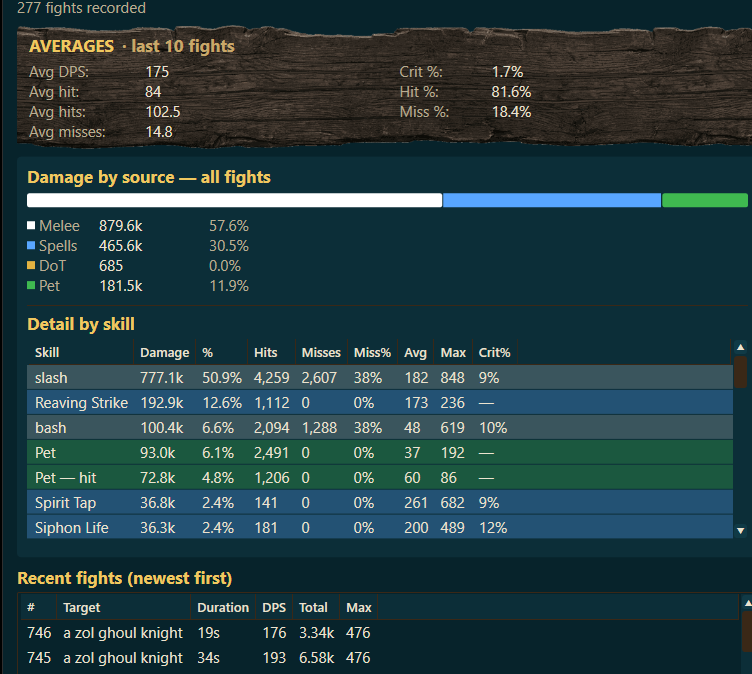
Double-click any attacker (or select them and use ⤢ Full stats) to open a dedicated window for just that combatant. It holds their whole story, not just the current fight:
- Averages · last 10 fights: their rolling Avg DPS, Avg hit, Avg hits, Avg misses, Crit %, Hit %, and Miss %, so one lucky pull doesn't skew the read.
- Damage by source · all fights: a stacked bar splitting their damage across Melee, Spells, DoT, and Pet, each with its total and share.
- Detail by skill: every ability they used (slash, bash, a nuke, a pet hit, and so on) with its damage, share, hits, misses, miss %, average hit, max hit, and crit %. This is where you learn whether a parse came from steady output or one lucky crit.
- Recent fights (newest first): their per-fight history: mob, duration, DPS, total, and max hit.
Pets and charm pets
By default the 🐾 Pets combined toggle is on, so a pet's damage, including a charmed pet's, merges into its owner's row. Your number then reflects you and your pet together, which is usually what you want when comparing your output to the group. Turn the toggle off and pets split out into their own rows, so you can see exactly how much the pet (or the charmed mob) is contributing on its own. Either way, pet damage also shows up as its own Pet and Pet hit lines in the per-skill detail.
Switch what the parse measures
The ⚔ View mode button isn't just outgoing damage. Cycle it to rank the same group three ways:
- Damage Done (⚔): the default: who's putting out the most.
- Damage Taken (🛡): who's eating the most, for spotting aggro problems.
- Healing (✚): who's keeping the group up, ranked the same way.
Keeping your log file from swallowing the disk
EverQuest's log grows for as long as logging is on, and on a long-running character it gets very large. Options & Stats → EQ log file handles it: tick Clear the log when it gets large, set the size to act at and how often to check, and the app empties it for you.
Keep a full copy before clearing is on, and should stay on. A complete copy is saved next to your log as an archive file before anything is cleared, so nothing is ever lost, and the app warns you plainly if you switch that off. Clearing the log doesn't interrupt the parse or anything else you're contributing.
Keep more than 300 fights of history
The meter saves your last 300 fights by default, with the oldest dropping off as new ones come in. To keep a longer history, open the Options & Stats tab, find the DPS meter section, and raise "Save up to N fights": anywhere from 10 to 2000. Bump it up if you want a big sample for averaging across a long camp.
Where to next
Questions about reading a parse, or want to compare numbers with other players? The BasaBots Discord is the place. Or jump in: