EQL

BasaBots EQL

Everything for Norrath,
in One App

One self-contained app for EverQuest Legends that brings loot, damage, and maps together: live zone maps, automatic quest tracking, a full DPS meter, spoken alerts with timers, and instant mob & item lookups, all in one place. Stop alt-tabbing to the wiki and just play.

Six Tools Aboard One Ship

Custom EQL Items Found
Custom EQL Quests Found
16Plane of Sky Tracker
25,755Mobs Tracked

EverQuest Legends' custom items and quests aren't on any wiki. These are what the community has turned up so far, counted live, and the number climbs every day people play.

EverQuest Live Map

See your whole zone

A live map of everything around you: every NPC and player as a con-colored dot, with the map keeping up as you move.

Read the full guide →
  • 🗺️

    Live zone map

    Every spawn shown live on your zone map: zoom, pan, toggle labels, and a 🌙 dark mode for night sessions.

  • 🎯

    Con-colored at a glance

    Every dot colored gray→red by relative level, so you read the room instantly.

  • 🧭

    Updates as you move

    The map updates your location automatically as you walk, and switches zones with you.

  • 🏔️

    Height filter

    Fade out-of-range mobs so crowded, multi-level dungeons stay readable.

  • 🪟

    Pop-out map over the game

    Pop the map into a floating window you can size, lock on top, and fade over EQ. Perfect for a single screen.

  • 🔔

    Alarms, highlights & timers

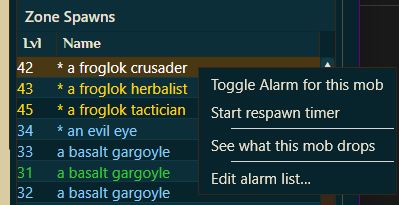
    Get called when a named pops, in one zone or every zone. Pick its ring color and chime, track quietly with no sound, and start a respawn countdown on any mob.
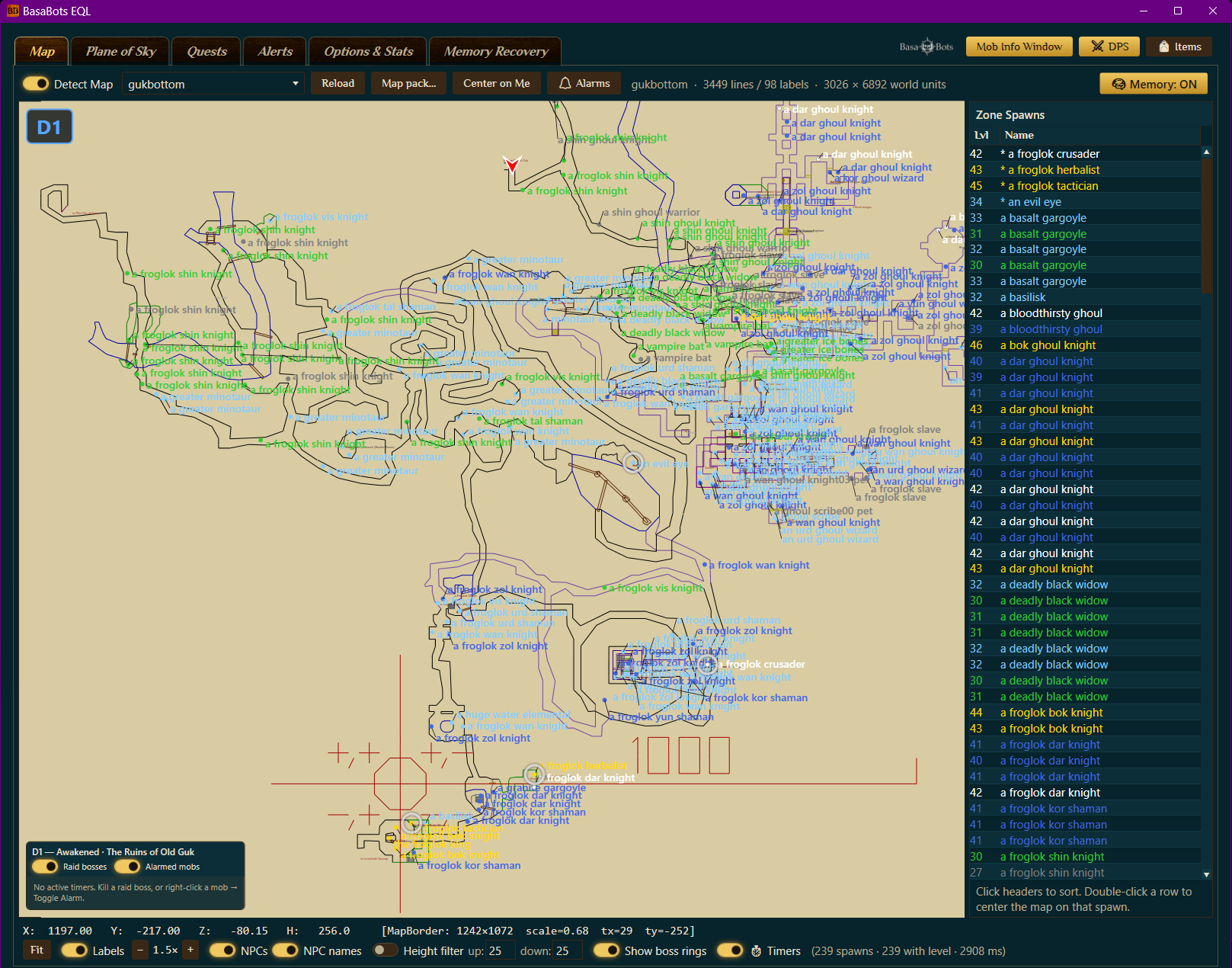
Live zone map

EverQuest Quest Tracker

Track every quest, automatically

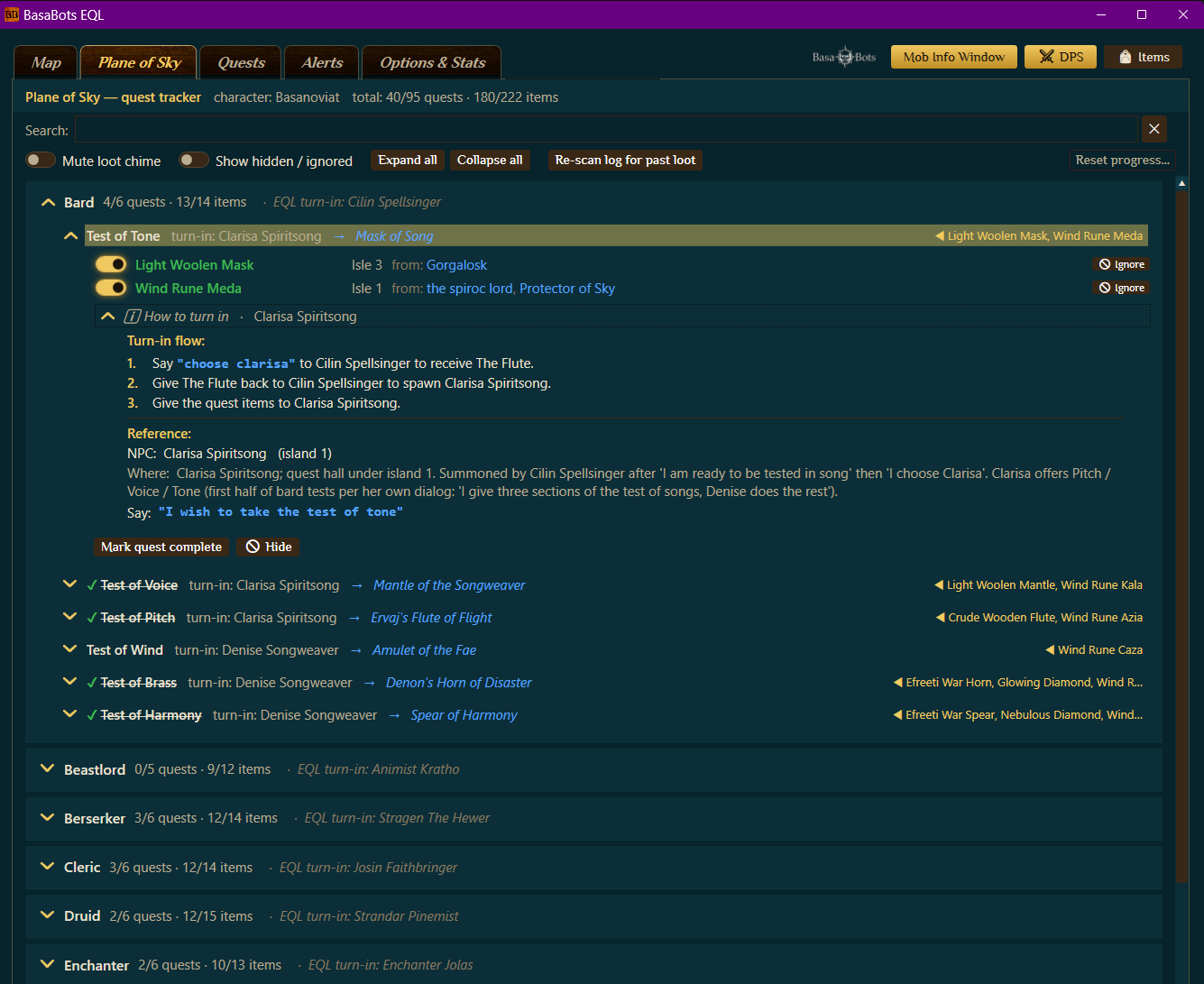
Whether you're on the Plane of Sky grind or your class epic, the app watches your loot and ticks items off as you find them.

Read the full guide →
  • 🪂

    Plane of Sky tracker

    All 16 class item quests, with auto check-off as you loot, island numbers, summoning phrases & full turn-in steps.

  • 📜

    1,800+ quest browser

    Quests spanning every era, plus custom EQL quests as they're found: filter by era, class, zone, level, or "epics only."

  • Auto loot detection

    Loot a quest item and it chimes, then surfaces the matching quest automatically.

  • 📌

    Pin & track

    Mark the quests you're running, hide the ones you aren't, and pick up across sessions.
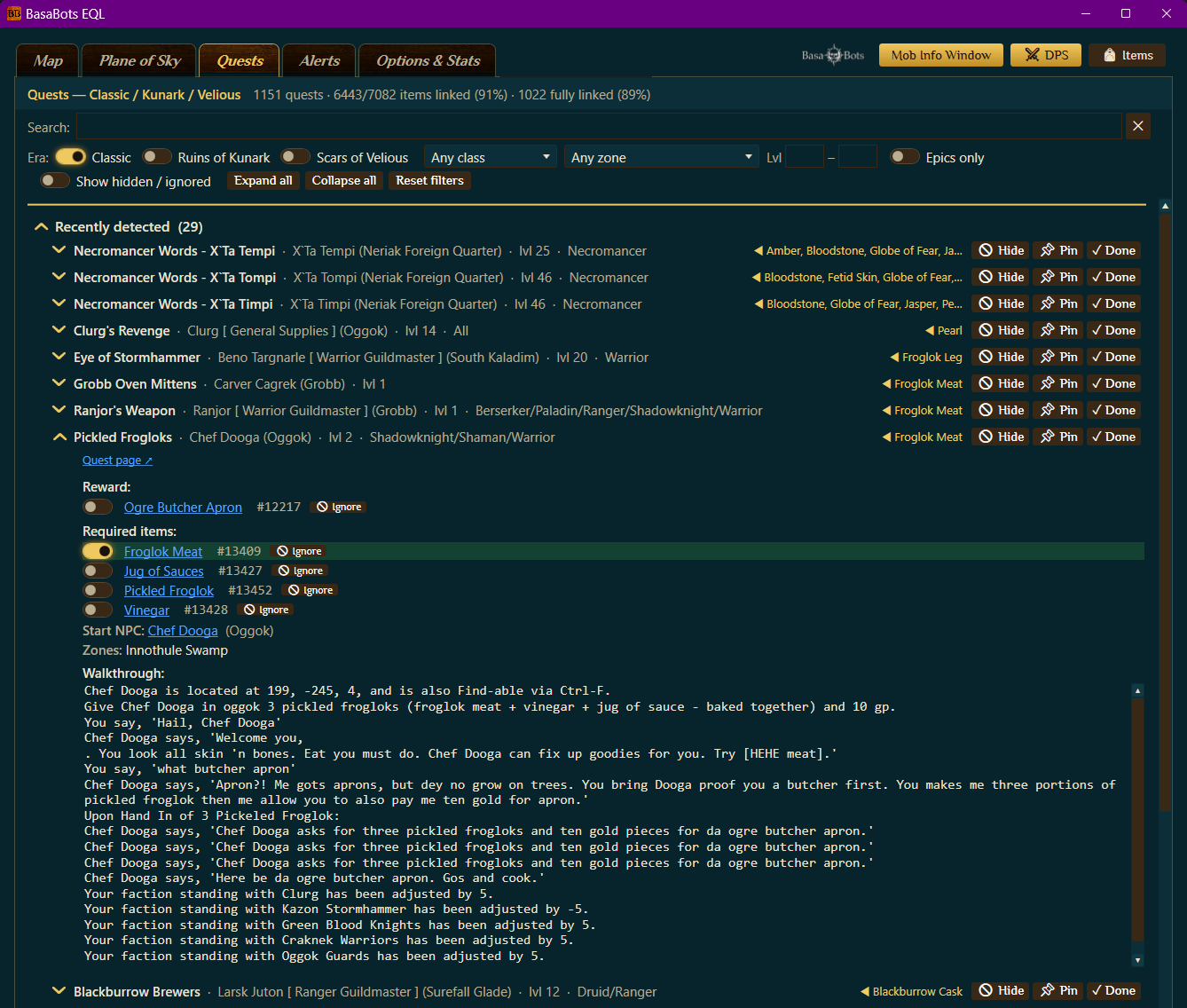
Quest browser and tracker

EverQuest DPS Meter

See who's topping the parse

A live parse that ranks every attacker by DPS as the fight happens. See who's carrying the group, how they're doing it, and every stat that proves it: hit %, crit %, max hit, and total damage.

Read the full guide →
  • ⚔️

    Live DPS rankings

    Every attacker ranked live by DPS and total damage, with max hit, crit %, hit %, and each player's share of the kill.

  • 📊

    Damage, taken & healing

    One toggle flips the parse between damage dealt, damage taken, and healing done, so you see who tops each board.

  • 📈

    Damage by skill

    Break any fighter down to the ability: hits, misses, crit %, average and max hit, plus lifetime totals and best-hit records.

  • 🧾

    Fight history

    A rolling 10-fight average and saved parses of your last 300 fights, so you can compare pulls and prove the trend.

  • ⏱️

    Fights that end when yours does

    Your parse follows what you and your group are actually fighting, so a busy camp can't keep the clock running and drag your DPS down. Pull three at once and it counts as one fight, with a picker to split it per enemy.

  • 🧬

    DPS by build

    Every fight is tagged with the multiclass build you were running, with a rolling average kept per build, so you can see which one actually parses best.
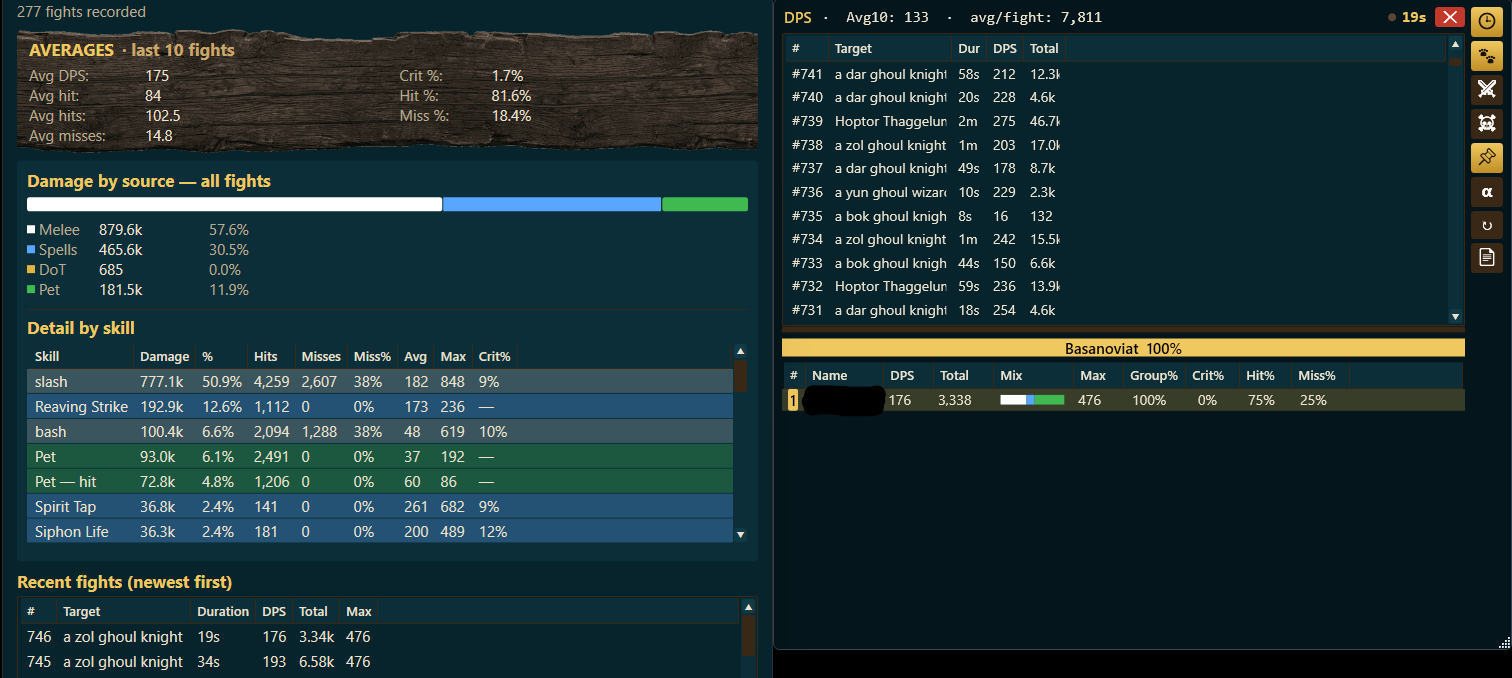
DPS meter with player stats

EverQuest Alerts & Triggers

Your lookout never sleeps

Turn any line of chat into a spoken call-out, a chime, an on-screen toast, or a countdown bar over the game. It all runs on your machine: no cloud, no account, nothing sent anywhere.

Read the full guide →
  • 🗣️

    A voice that calls it

    A natural neural voice speaks the words you wrote the moment they happen, even the mob's name. Repeated phrases play back instantly, so "charm broke" is as fast as a chime.

  • Countdown bars

    Slim, draggable timer bars over the game: a spoken warning before the end, amber as time runs out, auto-cancel when a buff drops early, and a re-cast restarts the clock.

  • 📚

    1,300 ready-made triggers

    A searchable library of available triggers: filter by class, purpose, or spell, click once, and it lands in your list switched off and fully editable.

  • 📥

    Bring your own triggers

    Your existing trigger packages (.gtp, .xml, .tgf.gz) import directly, with timer durations, warning texts, and early-end patterns intact.

  • 🧪

    A real editor

    Plain-English sections, live pattern checks, and a try-it box: paste a real log line, see the match, and preview exactly what it will say or play.
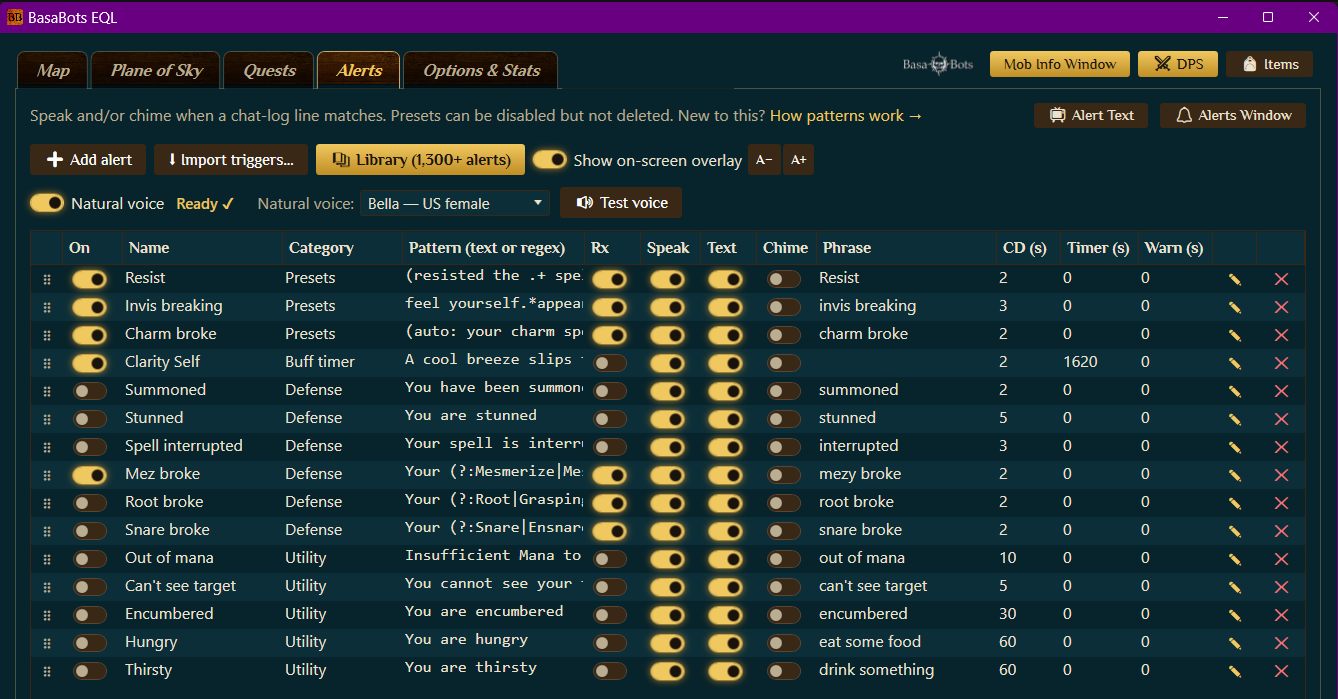
Alerts and timer bars

EverQuest Item Finder

Data on Items, Quests, and Mobs

Look up any item, mob, or quest and get the full picture: who drops what and how often, a mob's live stats and loot table, and every step of a quest.

Read the full guide →
  • 🔎

    Item lookup

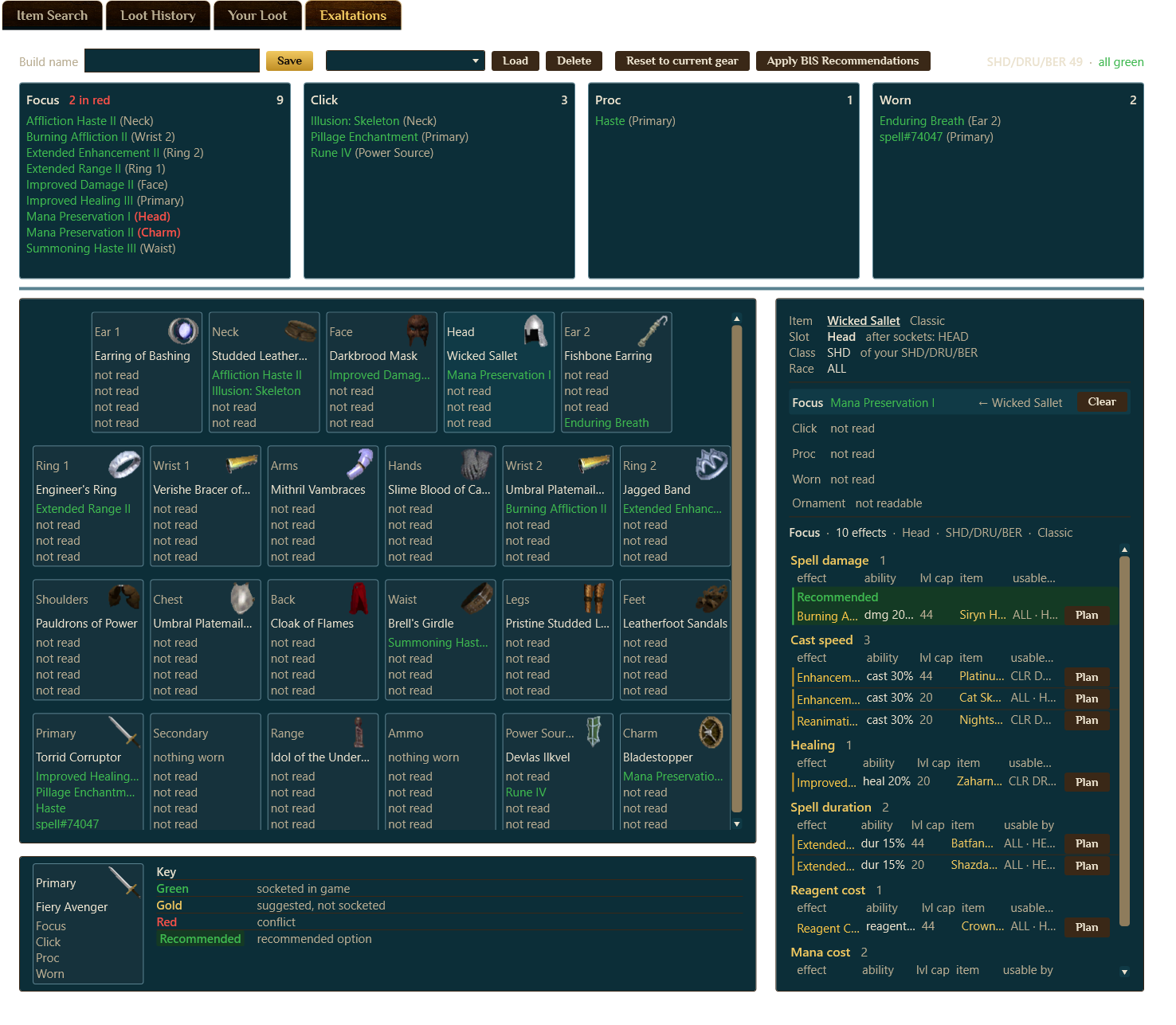
    Search an item → every mob that drops it, with drop %, era & rarity, plus deep filters by class, slot, stats, resists, weapon ratio & effects (proc/click/worn/focus).

  • 👹

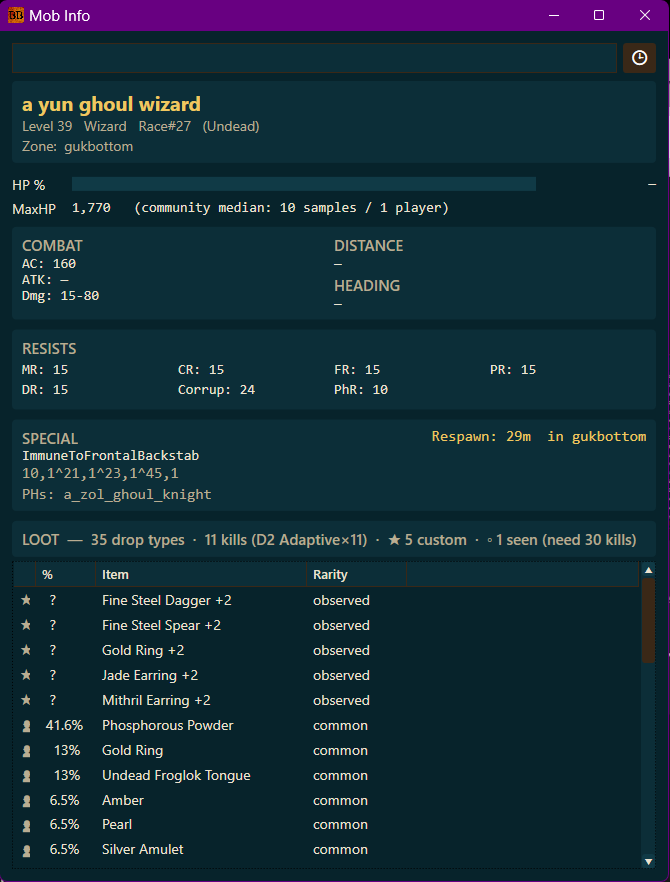
    Mob lookup

    Search or target a mob for HP, AC, resists, abilities & its full loot table.

  • 📜

    Quest lookup

    Pull up any quest for its items, turn-in steps, zones & rewards across every era.

  • 📊

    Smarter drop rates

    Your kills and loot build per-tier drop-rate data, so item odds sharpen the more you play.

  • 🤝

    Community drop data

    Opt in to anonymous, aggregated drop data, so pooled sightings sharpen every loot table.

  • 🎒

    Your Loot

    Everything you're carrying in one sortable list: equipped, inventory and every bag, with each item's full card. Filter to quest items and see what you're already holding.

  • 🧺

    Loot History

    Every item you've looted, newest first, flagged when it's used by a quest. Click any row to look it up, right-click for the mob that dropped it.
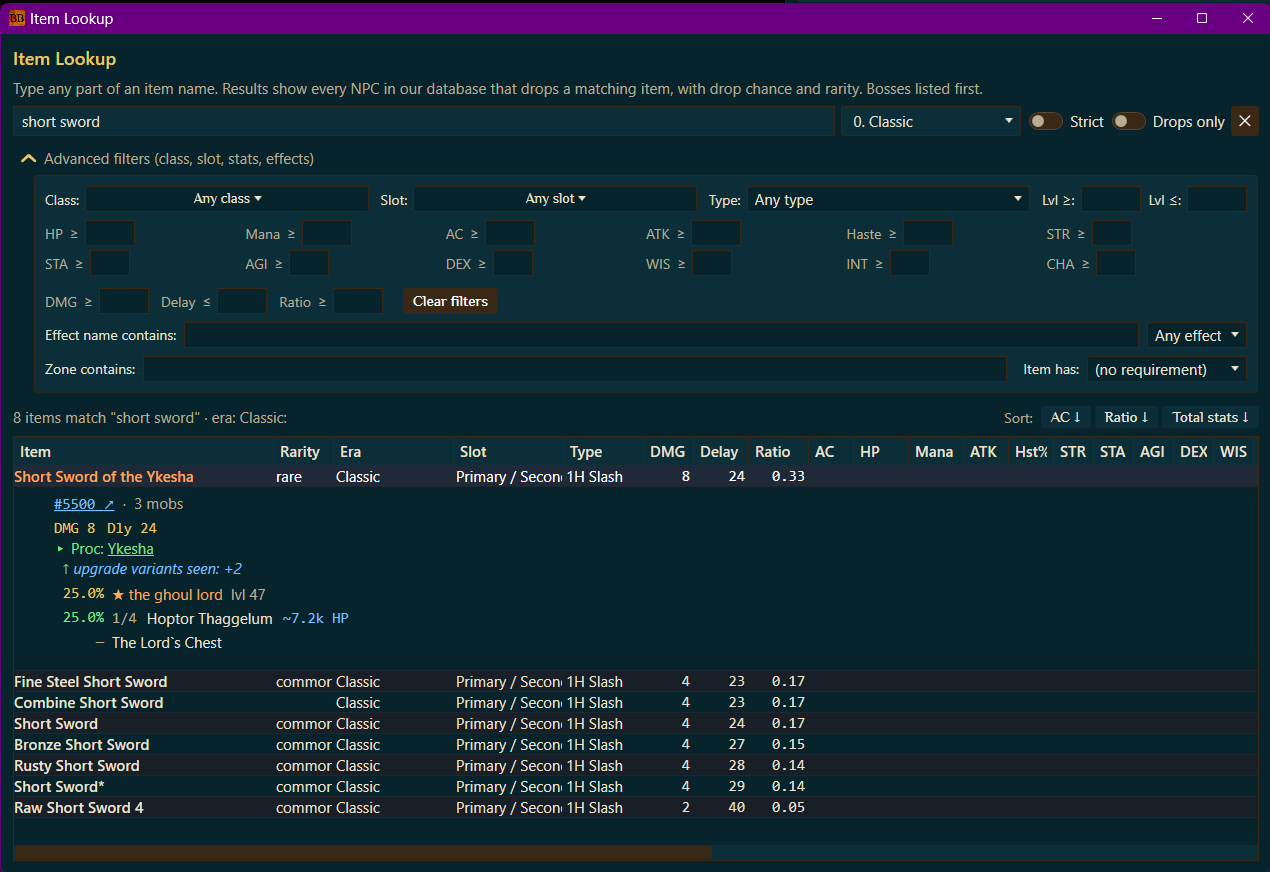
Item, mob and quest lookup

A look aboard

See it in action

One fair price. Everything aboard.

No tiers, no upsells, no plunder. Every tool, every update, one flat rate.

7-day free trial
$3/ month
  • Every feature unlocked: live map, quest tracking, DPS meter, alerts & timers, and item & mob lookups
  • Automatic updates, forever
  • One machine per subscription, swap anytime
  • Cancel whenever, no questions
Download the app

Windows 10/11 (64-bit) · ~140 MB · Auto-updating

…or buy a license →

Billed securely through Stripe. Unlock the app with your license key, no password to remember.

Tales from the crow's nest

What is BasaBots EQL?

A self-contained Windows companion app for EverQuest Legends. It brings loot, damage, and maps together in one place: a live map, quest tracking, a DPS meter, voice alerts with timers, and item & mob lookups, so you spend less time alt-tabbing to wikis.

Which version of EverQuest is it built for?

BasaBots EQL is built for EverQuest Legends. Some features may still work on other versions of EverQuest: the DPS meter and quest tracking read the standard EverQuest log file, so they aren't tied to one server. The live map and the EQL-specific quest data are tuned for EverQuest Legends.

Is it a GINA or GamParse alternative?

Yes. BasaBots EQL replaces both in one app: it runs live audio triggers and countdown timers like GINA, and imports your existing .gtp, .xml and .tgf.gz trigger packages, plus a live DPS meter and combat parser like GamParse that reads the standard EverQuest log file. A live map, quest tracker and item finder come alongside them.

Does it include EverQuest maps?

Yes. BasaBots EQL has a built-in live zone map that shows spawns and your position in real time, with no map files to download. EverQuest Legends also ships with pre-built maps, so you're covered in-game out of the box. If you prefer external map files, you can add community sets such as Brewall's maps.

Does it track custom EverQuest Legends quests?

Yes. BasaBots EQL tracks EverQuest Legends' custom quests, not just classic EverQuest content, and keeps the quest data up to date inside the app. Filter by era, class, zone or level, with auto check-off as you loot and full turn-in steps.

Does it have custom EverQuest Legends item data?

Yes. The item finder carries up-to-date data on EverQuest Legends' custom items: who drops them, drop rates, stats and effects, so you can look up EQL-specific loot the same way you would classic items.

How do I download and install BasaBots EQL?

Click Download on this page to get the installer, run Setup.exe, and launch the app. There's no account or email to start: you get a 7-day free trial with everything unlocked, then it's $3/month. If Windows SmartScreen warns you, click More info, then Run anyway.

Can I use my subscription on more than one PC?

Your subscription activates one machine at a time, and moving to a new PC is fine: you unlock each machine with your license key, and switching computers just re-activates on the new one. The free trial is one machine, tied to that PC.

Windows says the installer isn't safe: is it really safe?

Yes. You're seeing the SmartScreen "Windows protected your PC" warning that shows up for any installer without a code-signing certificate. Ours is on the way; until it's in place, click More info on the warning, then Run anyway. You can also right-click the downloaded Setup.exe, choose Properties, tick Unblock, hit OK, and run it normally. The installer itself is the same Velopack-built file linked from this site, nothing else.

Does it modify or automate the game?

No. BasaBots EQL is strictly read-only. It reads information the game already shows you and the chat log the game already writes, and displays it more usefully. It never writes to, edits, patches or injects anything into the game client, it never sends keystrokes, clicks or commands, and it does not automate or play any part of the game for you. There is no botting, no macroing, no movement, no combat automation, and nothing that acts on your behalf. Every action in EverQuest is still yours.

Do the voice alerts need an account or the internet?

No. The natural voice runs entirely on your PC after a one-time download, so alerts cost nothing per use and nothing you trigger ever leaves your machine. If the voice is unavailable it falls back to your Windows voice automatically.

How does the free trial work?

Just install the app and you get 7 full days with everything unlocked. No email, no card, nothing to sign up for. The trial is tied to your machine and verified online, so it's a genuine one-time week.

What does it cost after the trial?

$3/month, billed securely through Stripe. Cancel anytime from the Stripe customer portal, which the Manage subscription button on the app's Options & Stats page opens for you, and keep access until the period ends.

Do I need to enable anything in-game?

Most features work out of the box. The DPS meter and quest auto-detection need your in-game combat logging turned on, and the app tells you if it's off.

How do I sign in?

There's no account or password. You unlock the app with the license key from checkout, shown on the welcome page right after you pay and any time in your Stripe customer portal. A subscription activates one machine at a time; moving to a new PC is fine.

Is my data private?

Your settings stay on your PC. The optional community feature shares only anonymous, aggregated drop data, never tied to your account, email, or character.

Can I see what I'm carrying and what I've looted?

Yes. Your Loot lists everything you're carrying, equipped gear, general inventory and every bag, in one sortable table with each item's full card, and you can filter it down to just quest items. Loot History keeps every item you've picked up, newest first, flagged when a quest uses it, so you can check whether you already have a turn-in without digging through your bags. Both live in the Item Finder window.

Does it work on a single monitor?

Yes. The map, the DPS meter and the alert text all pop out into floating windows you can size, lock above the game, and fade to whatever transparency you like, so they sit over EverQuest in windowed or borderless mode without taking a second screen. The map also has a 🌙 dark mode for night sessions.

Does the DPS meter work for a whole group?

Yes. Every attacker in the fight is ranked live, with each player's share of the kill. Pets merge into their owner by default or split into their own rows. You can right-click a name to always include someone the app can't see in group chat, like a second account or a mercenary, or to hide a passing stranger, and their damage is still recorded either way.

How do I know what's new in the app?

The app updates itself, so you get every new feature the next time you launch it. Every release is listed on the What's New page, and in the app's own What's New window.